
FirstTake Verified
Launched Monday, November 2, 2026
FirstTake makes AI-assisted films on Mac for independent creators
FirstTake is a Mac video studio with an AI agent that plans scenes, generates and edits video, and exports a finished MP4. It is aimed at creators who want to make films by describing them in plain language, and the site lists a $14.99 one-time launch price, with generation billed separately by the chosen provider.
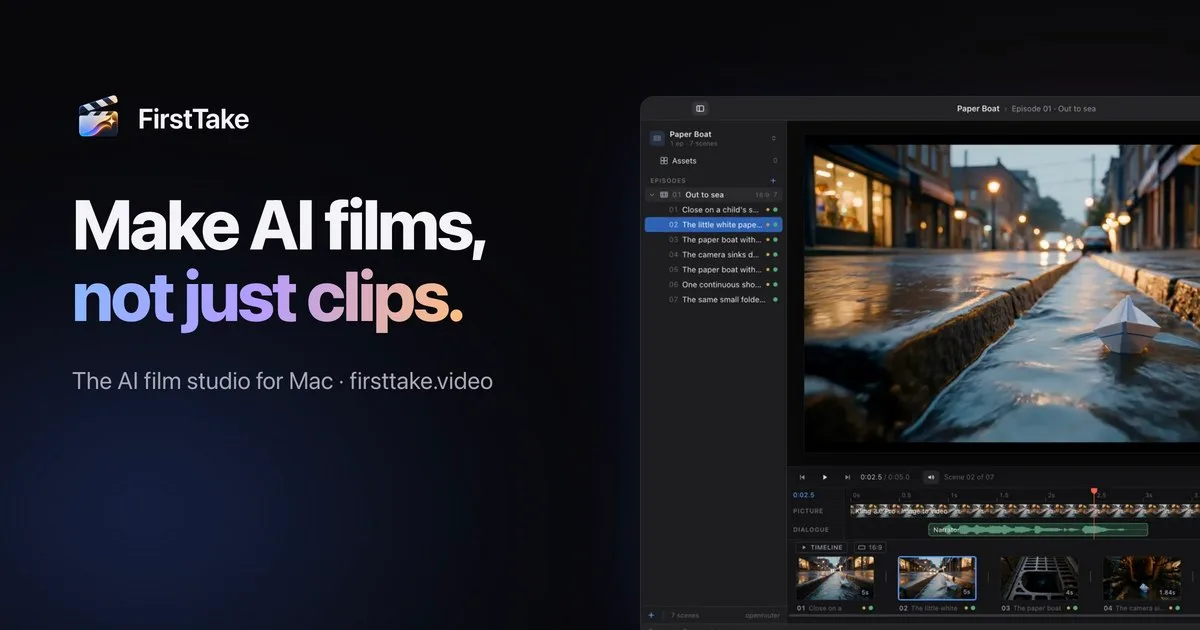
FirstTake is a video editor for Mac that uses an AI agent to turn a plain-language film brief into scenes, generated media and an exported MP4. It aims to reduce the manual work of planning shots, generating footage and assembling a cut, while leaving the project open for hands-on editing.
The important distinction is that the purchase does not pay for AI generation. FirstTake connects to providers such as fal.ai, OpenRouter or Higgsfield, shows estimated costs before paid steps and asks for approval. Its built-in agent can also work alongside coding agents through a local MCP server.
How does FirstTake work?
FirstTake turns a written description into a video project through a sequence of planning, generation, review and export. The agent can draft scenes, choose models, generate shots, add dialogue, music and titles, then inspect the results before calling the work done.
FirstTake is designed to carry visual continuity across a sequence: the site says each shot starts where the last one ended, with rooms, light and characters carried through the cut. The two frames below illustrate a scene ending and the next scene beginning from it.
- Describe the film or ask the agent for a specific task, such as turning photos into a trailer.
- Review the planned scenes and the model and estimated cost shown for each paid step.
- Allow, decline or change the model before generation proceeds.
- Review the generated work, make edits in the project and export the finished MP4.

How does FirstTake control AI generation costs?
FirstTake shows the model and estimated price before a paid generation step, and it does not run that step until the user allows it. The user can approve one step, allow the remaining steps in a conversation or decline. The model can also be changed on the approval card.
The app itself does not include generation credits. Video, image, voice and music generation are billed by the selected provider at that provider's prices, with no markup from FirstTake. The site lists fal.ai, OpenRouter and Higgsfield as supported providers. Without a provider key, the app can open and edit projects but cannot generate media.
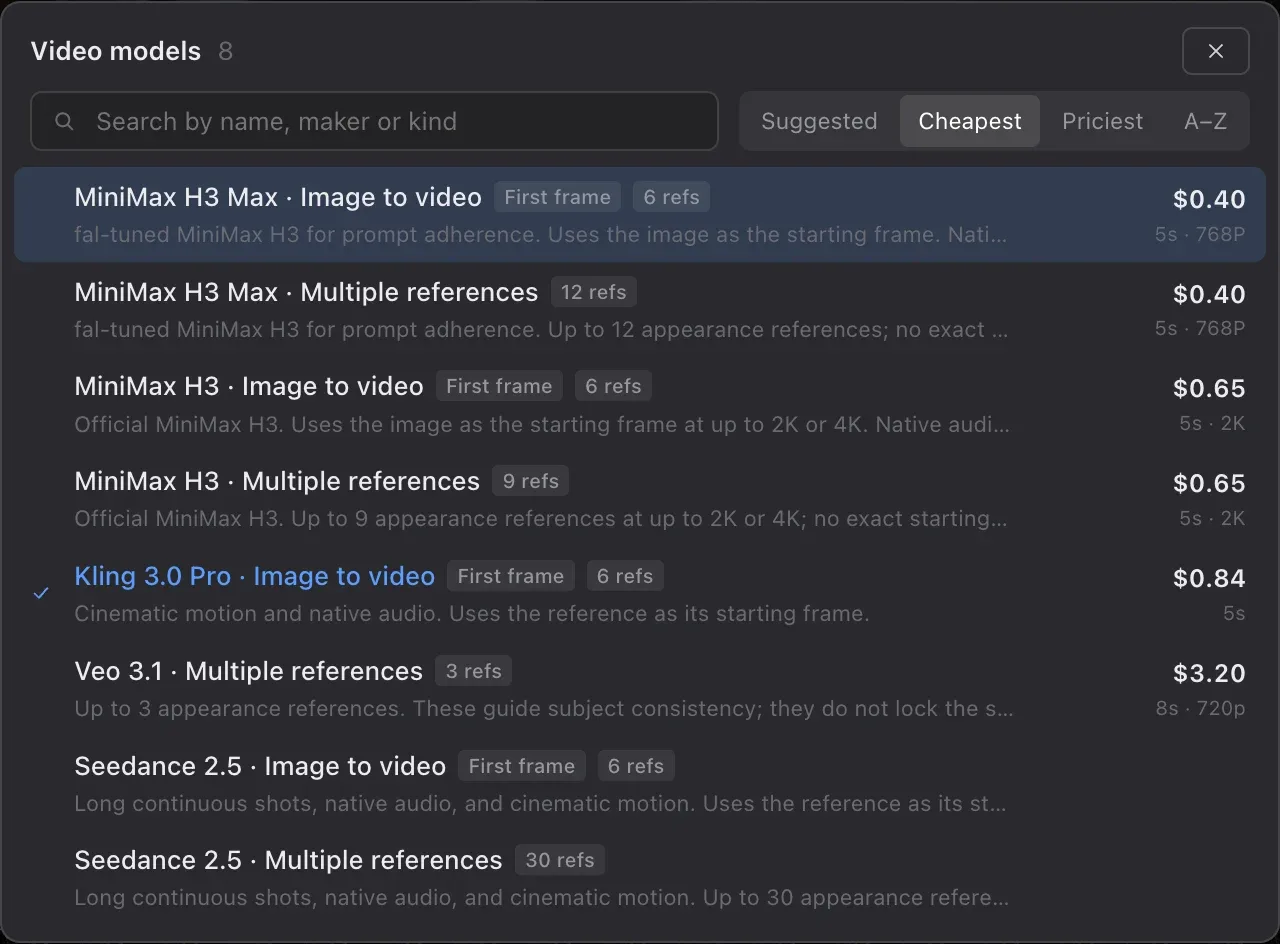
FirstTake labels each take with the provider and its cost, including takes that are not kept. The model picker in the image shows models sorted by price per take, making cost a visible choice rather than a hidden subscription allowance.
- Paid steps require approval before they run.
- Provider charges are separate from FirstTake's one-time purchase.
- Users supply their own account and API key for a supported provider.
Can you edit a FirstTake project by hand?
Yes, FirstTake lets users edit the agent's project directly in a conventional timeline instead of treating the generated output as a finished, unchangeable file. The site describes the project as an ordinary FirstTake project that can be opened and changed by hand.
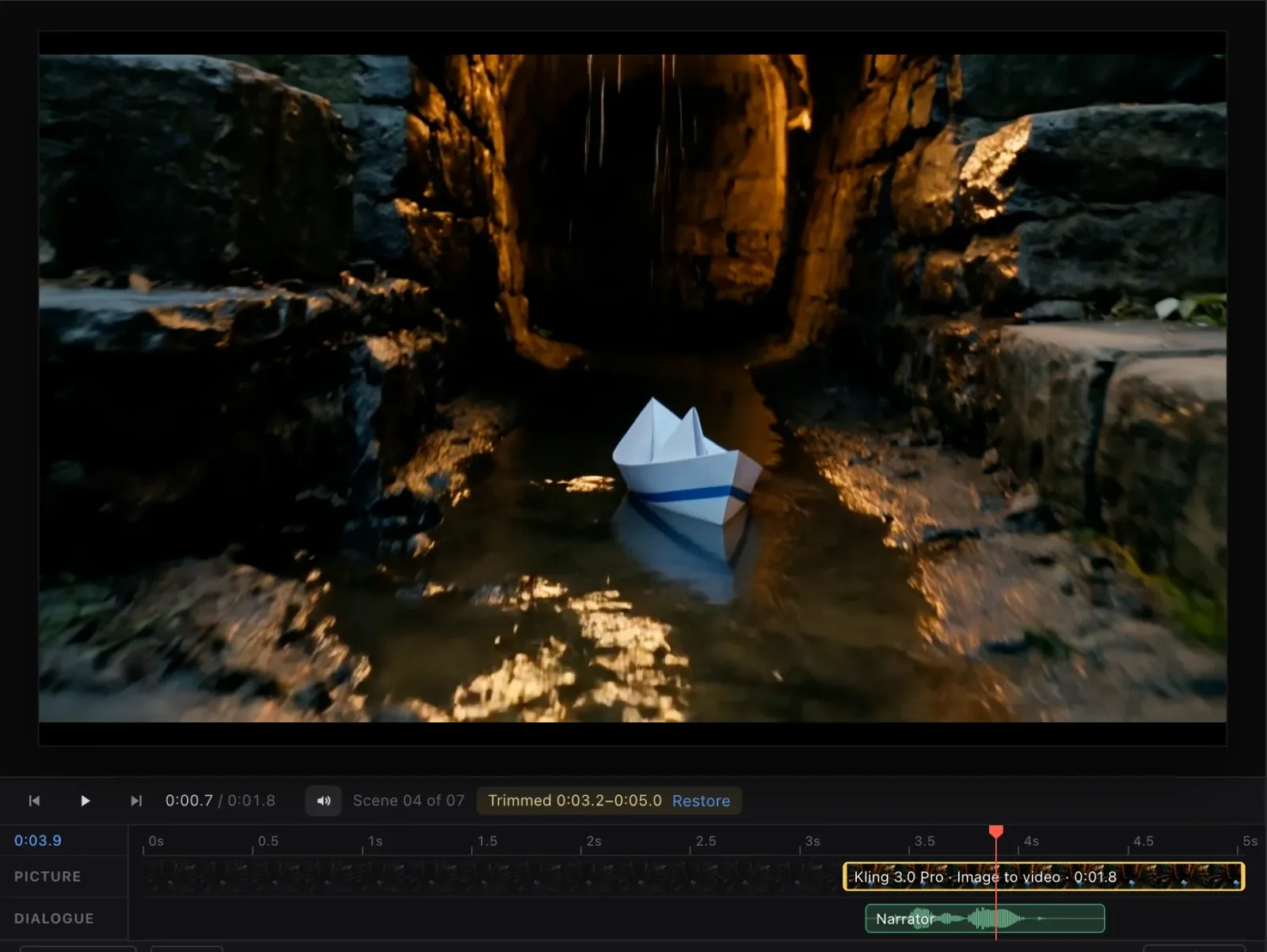
The editor includes scene trims, titles, colour grading, captions, music mixing and assets. A take can be trimmed to a tenth of a second and restored without rendering it again. FirstTake says its music tools support fades and ducking, while character voices can be kept consistent from scene to scene.
This matters when a generated shot is usable but too long. The example shown trims a scene from 3.2 to 5.0 seconds and offers Restore, rather than requiring a fresh generation.
- Add images to the picture or bring them in from the asset bin.
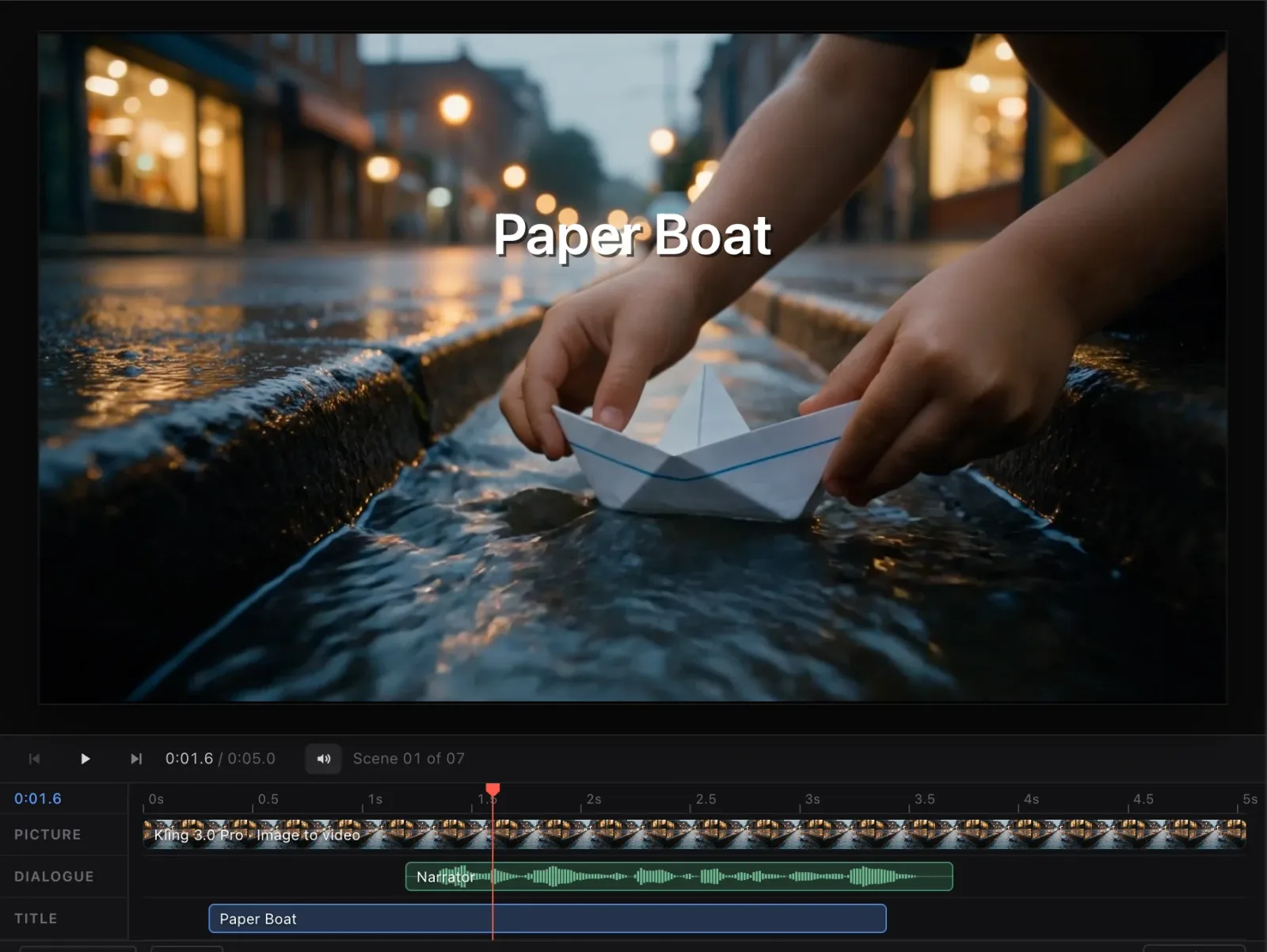
- Use separate picture, dialogue and title lanes in the timeline.
- Export a finished MP4, then open it or show it in Finder.
Can other AI agents use FirstTake?
FirstTake can provide its video studio to Claude Code, Cursor, VS Code, Windsurf, Codex and other MCP clients through a server that runs on the Mac. The site says setup is available in Settings, where a one-click action connects supported agents to FirstTake.
An agent can make a video project through a create_video call, while FirstTake provides storyboard, approval and preview panels. The user still approves paid rendering before it proceeds. The local MCP server listens on 127.0.0.1, and the site says connected agents do not see the user's provider keys.
The timeline shown here has separate picture, dialogue and title lanes, illustrating the editable project that can be opened after an agent builds it. FirstTake is therefore relevant to people who already use coding agents and want them to create or revise video projects.
What does FirstTake cost, and what happens to project data?
FirstTake is sold as a one-time Mac licence, with the site showing a launch edition at $14.99 and later price tiers. The site describes the purchase as including the editor, built-in agent, MCP server, updates and commercial use of films made with the app. The current price and remaining launch licences can change, so check the pricing and purchase page before buying.
Generation is a separate, ongoing cost charged by the provider account used for video, images, voices or music. A 14-day refund is offered for the FirstTake licence, but provider charges are not covered by that refund.
Projects are saved as files on the Mac, and FirstTake says it does not run servers that receive project files, prompts or media. When a user generates content or uses the director, prompts, attached reference images and dialogue text are sent to the selected provider. Optional usage analytics are off unless the user chooses to share them; the privacy notice explains what those analytics collect and how to turn them off.
The licence agreement says projects, prompts and media created by the user are theirs, while provider terms, charges and generated output remain subject to the provider's terms.
Who it is for
- Independent creators who want to turn a written brief into a short film or trailer
- Mac users who want an AI agent to plan and generate scenes, then edit the result themselves
- Creators who want approval and cost estimates before paid AI generation
- People using Claude Code, Cursor, Codex or another supported MCP client to build video projects
Who it may not suit
- People who need video generation included in the software purchase
- People who need a Windows, Linux or browser-based video editor
- People who want video generation to run without their approval
Pricing
$14.99 one-time launch price shown; generation costs are billed separately by your provider
- Launch edition, $14.99 one-time, as listed on the site: The Mac editor, built-in agent, MCP server, updates and commercial use. Video, image, voice and music generation are billed separately by the user's provider.
Should you try it?
FirstTake is worth considering for Mac users who want an agent to plan and generate a film but still want cost approval and access to a hands-on timeline editor. The one-time licence is relatively straightforward to assess, but the total cost depends on provider usage and requires a supported provider account and key. Check the current licence price and provider rates before committing, especially if you expect to generate many takes.
Questions people ask
Is FirstTake free?
No, FirstTake is a paid Mac app. The site lists a one-time launch price of $14.99, while AI generation is billed separately by the provider account you use.
What is FirstTake used for?
FirstTake is used to plan, generate, edit and export video projects on a Mac. Its built-in agent can turn a plain-language description into scenes, generated media and an MP4.
Does FirstTake include AI video credits?
No, FirstTake does not include generation credits. Video, image, voice and music generation use your own fal.ai, OpenRouter or Higgsfield account and are charged by that provider.
Does FirstTake work with Claude Code, Cursor or Codex?
Yes, FirstTake has a local MCP server and one-click setup for Claude Code, Cursor, VS Code, Windsurf and Codex. The site also says it can work with other MCP clients.
Can I edit a video after FirstTake generates it?
Yes, FirstTake projects can be edited in its timeline. Users can adjust trims, titles, colour, captions, music and scene assets before exporting an MP4.