Upstep Verified
Launched Monday, November 2, 2026
Upstep collects in-app feedback and feature votes for product teams
Upstep is a feedback widget and voting board for web and mobile app teams. It collects bug reports and feature requests inside a product, organizes them for triage, and offers a free plan, with paid plans from $14.99 per month.
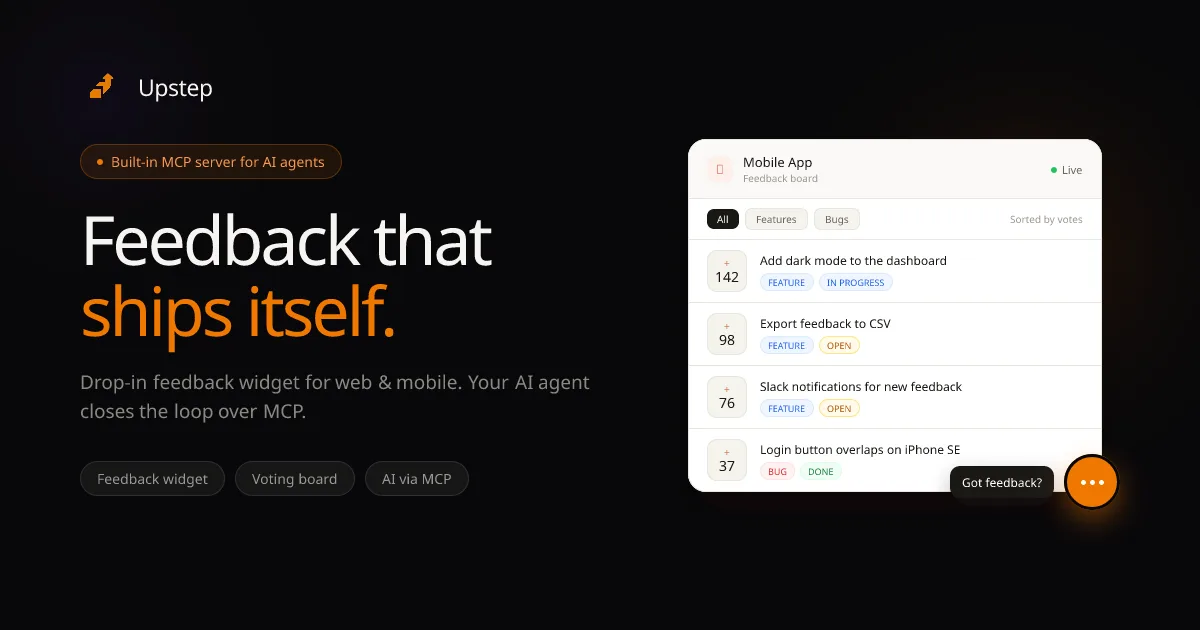
Upstep is an in-app feedback widget and voting board that helps product teams collect bug reports and feature requests where customers already use their app. Feedback goes into a shared board, where teams can review requests, see votes, and track statuses instead of relying on scattered messages.
The product is aimed at developers who want to add feedback collection without building the widget and its backend themselves. Upstep also has an MCP server that lets compatible AI coding agents read and update a project’s feedback board, while keeping internal agent tasks separate from the customer-facing roadmap.
What does Upstep do?
Upstep gives web and mobile products an embedded way to gather feedback, feature requests, and votes. Users can submit feedback from inside an app, and teams can review submissions in a board sorted by votes.
Upstep’s feedback board is intended to be more than a public request list. Teams can group similar requests, use votes as one signal for prioritization, and move work through statuses such as Open, In Progress, and Done. The feedback board overview explains the product’s collection, voting, and status workflow.
Upstep also supports a public roadmap, while keeping development tasks and an AI agent’s separate board internal by default. That division matters for teams that want customers to see the progress of selected requests without exposing internal work.
- Collect bug reports, feature requests, and general feedback.
- Let users vote on requests and see status updates.
- Keep internal development tasks separate from the public roadmap.
How does Upstep work?
Upstep works by connecting a project’s feedback widget to a board where the team can triage submissions. The site describes a three-step setup, starting with creating a project and getting an API key.
- Create a project in Upstep to get a project API key.
- Add the SDK or widget to the app. Upstep says the basic integration takes two lines of code.
- Review feedback on the board, where submissions are sorted by votes, and move selected work through statuses.
What stands out about Upstep?
Upstep combines a developer-focused feedback widget with an MCP server for AI coding agents. The server can read feedback, create and update tasks, change statuses, and post comments. Upstep names Claude Code, Codex, Cursor, Windsurf, and Copilot among compatible clients, and says other MCP clients can connect to its hosted endpoint.
Access is scoped to a single project using a private MCP key, which is separate from the publishable SDK key embedded in an app. The setup guide recommends keeping the private key out of a code repository and starting with read-only triage before making changes. Teams evaluating this workflow can consult the MCP connection guide.
Upstep is open source and self-hostable. The site says the application is available under AGPL-3.0 and its SDKs under MIT, and lists the dashboard, APIs, roadmaps, integrations, SDKs, and MCP server as part of the open-source application. Its integration directory covers options including React, Next.js, Vue, Svelte, Astro, WordPress, Shopify, React Native, Expo, and Flutter.
- The web widget is listed as under 10 kB gzipped.
- The site lists React, vanilla JavaScript, a script tag, React Native, and Flutter SDK options.
- Upstep says its MCP server is hosted, so teams do not need to deploy that server themselves.
Who is Upstep for?
Upstep suits teams that want to collect and prioritize product feedback inside their app rather than send users to an external board. Its use cases include SaaS products, mobile apps, developer tools, online stores, internal tools, beta programs, and open-source projects.
Upstep can be useful to product managers who need vote counts and a simple status pipeline alongside requests and bug reports. Votes are one prioritization input, not a replacement for judging effort, strategy, or customer impact. The product manager use case describes that approach.
Upstep may also suit small teams that want to start without a paid plan or a larger support suite. The product focuses on feedback, voting, and triage, rather than presenting itself as a combined live-chat and support-inbox system. Teams looking for a wider set of customer support functions may need another product or an additional tool.
- SaaS and developer-tool teams collecting requests from users in their product.
- Mobile app teams that want a native feedback flow for React Native or Flutter.
- Product managers who want votes and statuses to inform backlog discussions.
- Open-source maintainers or internal-tool teams that want a shared feedback board.
How much does Upstep cost?
Upstep has a free plan and two paid plans, with prices shown in USD and charged in local currency at checkout. The pricing page lists the following limits and features.
- Free: $0 per month, one project, up to 100 feedback items, voting, web and mobile SDKs, widget customization, and community support.
- Pro: $14.99 per month, up to 10 projects and 5,000 feedback items per project, with email support.
- Business: $49.99 per month, unlimited projects and feedback items, removal of Upstep branding, and priority support.
Who it is for
- SaaS teams collecting requests and bug reports inside their product
- Mobile app developers using React Native or Flutter
- Product managers who want votes and statuses alongside feedback
- Open-source maintainers looking for a board where users can vote on feature requests
Who it may not suit
- Teams looking for a full support inbox and live-chat suite as their main product
- Organizations that need a feedback system without a project or board workflow
Pricing
Free plan, Pro at $14.99 per month, Business at $49.99 per month
- Free, $0 per month
- Pro, $14.99 per month
- Business, $49.99 per month
Should you try it?
Upstep is worth trying for a product team that wants an embedded feedback widget, user voting, and a straightforward triage board without building those pieces itself. The free plan gives teams a way to test the workflow, with a limit of one project and 100 feedback items. Its MCP server and self-hosting option may appeal to developer-led teams, while teams that need a full support inbox or live chat should assess whether Upstep’s narrower focus is enough.
Questions people ask
Is Upstep free?
Yes, Upstep has a free plan. It includes one project and up to 100 feedback items, plus voting and widget customization.
What is Upstep used for?
Upstep is used to collect in-app feedback, bug reports, feature requests, and votes. Teams review submissions on a board and can track work through statuses.
Does Upstep work with React Native and Flutter?
Yes, Upstep lists SDKs for both React Native and Flutter. Its plans also include web support.
Can an AI coding agent access Upstep feedback?
Yes, Upstep includes a hosted MCP server for compatible clients such as Claude Code, Codex, and Cursor. A private MCP key scopes access to one project.